Assign Contract Owner Tab
Assign Contract Owner is the first tab on the Contract Owners screen. This tab lets you view which contracts contract owners are assigned to and modify these contract owner assignments.
Navigation
This tab is located on the Contract Owners screen. To access this screen, navigate to Configuration > Contract Owners from the left-side navigation pane.
Available Actions
On the Assign Contract Owner tab, you can:
-
Run and Download the Contract Owner Assignment Report. This report can be used as a template to modify contract owner assignments.
Field Descriptions
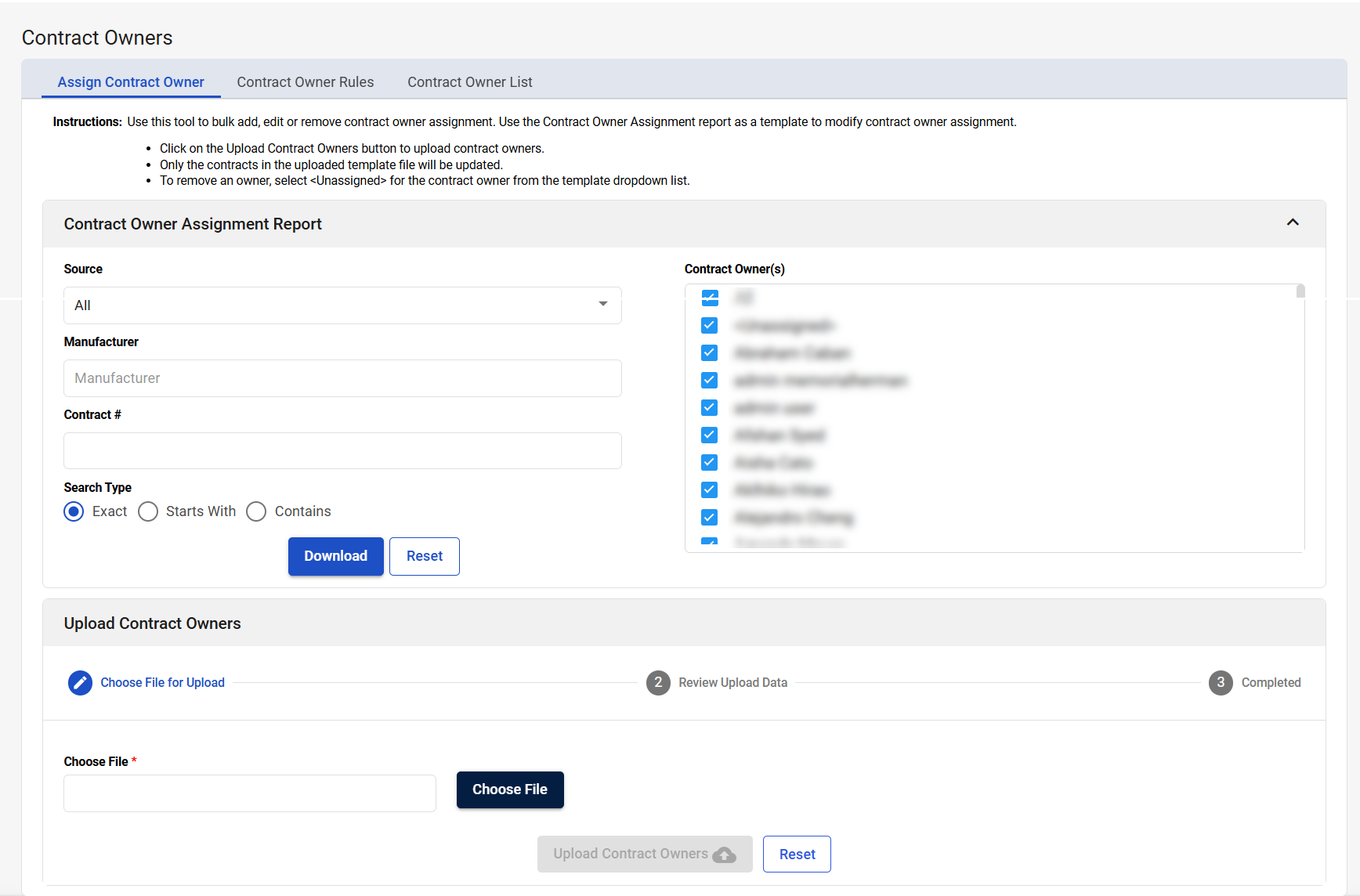
The following fields appear on the Assign Contract Owner tab.
|
Field |
Field Description |
|---|---|
|
Contract Owner Assignment Report |
|
|
Source |
Select a source to return contracts associated with the source in the Contract Owner Assignment Report. The default is All. |
|
Manufacturer |
Select a manufacturer to return contracts associated with the manufacturer in the Contract Owner Assignment Report. Manufacturers are suggested as you type. |
|
Contract # |
Enter a contract number to return specific contracts in the Contract Owner Assignment Report. This field works with the Search Type search field. |
|
Search Type |
This field works with the Contract # search field to filter contracts using the contract number you entered in the Contract # search field. The available options are:
|
|
Contract Owner(s) |
Select contract owners to return contracts associated with the contract owners in the Contract Owner Assignment Report. The default is All. |
|
Download |
Select to download the Contract Owner Assignment Report. This report is downloaded in XLSX format. |
|
Reset |
Select to reset your report parameters. The search fields are returned to their default state. |
|
Upload Contract Owners: Choose File for Upload |
|
|
Choose File |
Select Choose File to search for and select the updated Contract Owner Assignment Report that will be used to modify contract owner assignments. |
|
Upload Contract Owners |
Select to upload the updated Contract Owner Assignment Report that will be used to modify contract owner assignments. |
|
Reset |
Select to remove the selected Contract Owner Assignment Report. This is useful if you selected the wrong file or an error occurs. |
|
Upload Contract Owners: Review Upload Data |
|
|
# Item(s) |
Displays the number of contract owner assignments listed in the table. |
|
Clean Contract Owner (#) |
Displays the updated contract owner assignments you uploaded. These contract owner assignments are error-free and will be uploaded to CCXpert. |
|
Problem Contract Owner (#) |
Displays the uploaded contract owner assignments where there are errors. The reasons for these errors are displayed in the Message column. You must resolve these errors before the contracts can be uploaded to CCXpert. To resolve these issues, modify the Contract Owner Assignment Report you uploaded and reupload the report. |
|
Upload Contract Owners: Completed |
|
|
Success message |
Displays a “Congratulations! Contract Owner is successfully uploaded!” message when the updated contract owner assignments have been successfully uploaded. |
|
Upload Another Clean Contact Owner |
Select to upload another Contract Owner Assignment Report. |