Completed
The Completed screen is the fifth and final part of the Single Contract Upload process. This screen presents a confirmation message when the contract is successfully uploaded and the Single Contract Upload process is finished. This screen also gives you the ability to start another contract upload.
Navigation
This screen appears when you select Next on the Contract Attributes step.
Field Descriptions
The following fields appear on the Completed screen.
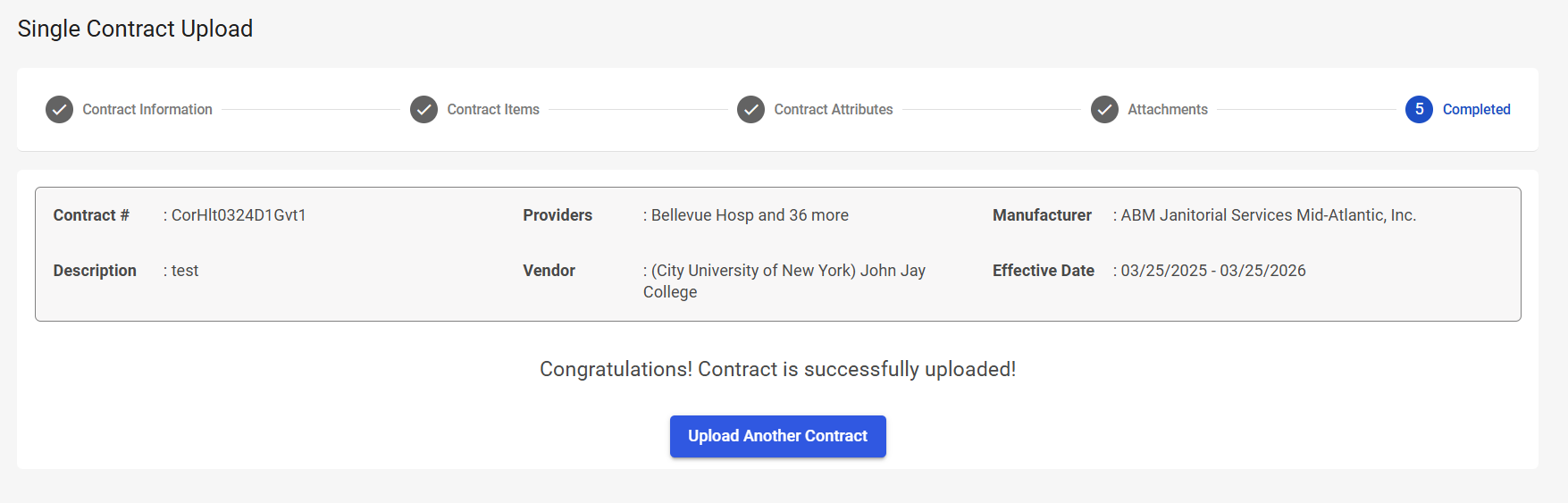
|
Field |
Field Description |
|---|---|
|
Contract Information |
|
|
Contract # |
Displays the contract number. |
|
Providers |
Displays the providers associated with the contract. |
|
Manufacturer |
Displays the manufacturer associated with the contract. |
|
Description |
Displays the contract description. |
|
Vendor |
Displays the vendor associated with the contract. |
|
Effective Date |
Displays the contract start and end date. |
|
Completed |
|
|
Confirmation message |
Displays a confirmation message, letting you know that the contract was successfully uploaded: “Congratulations! Contract is successfully uploaded!” |
|
Upload Another Contract |
Select to restart the Single Contract Upload process for a new contract. |