Validate File
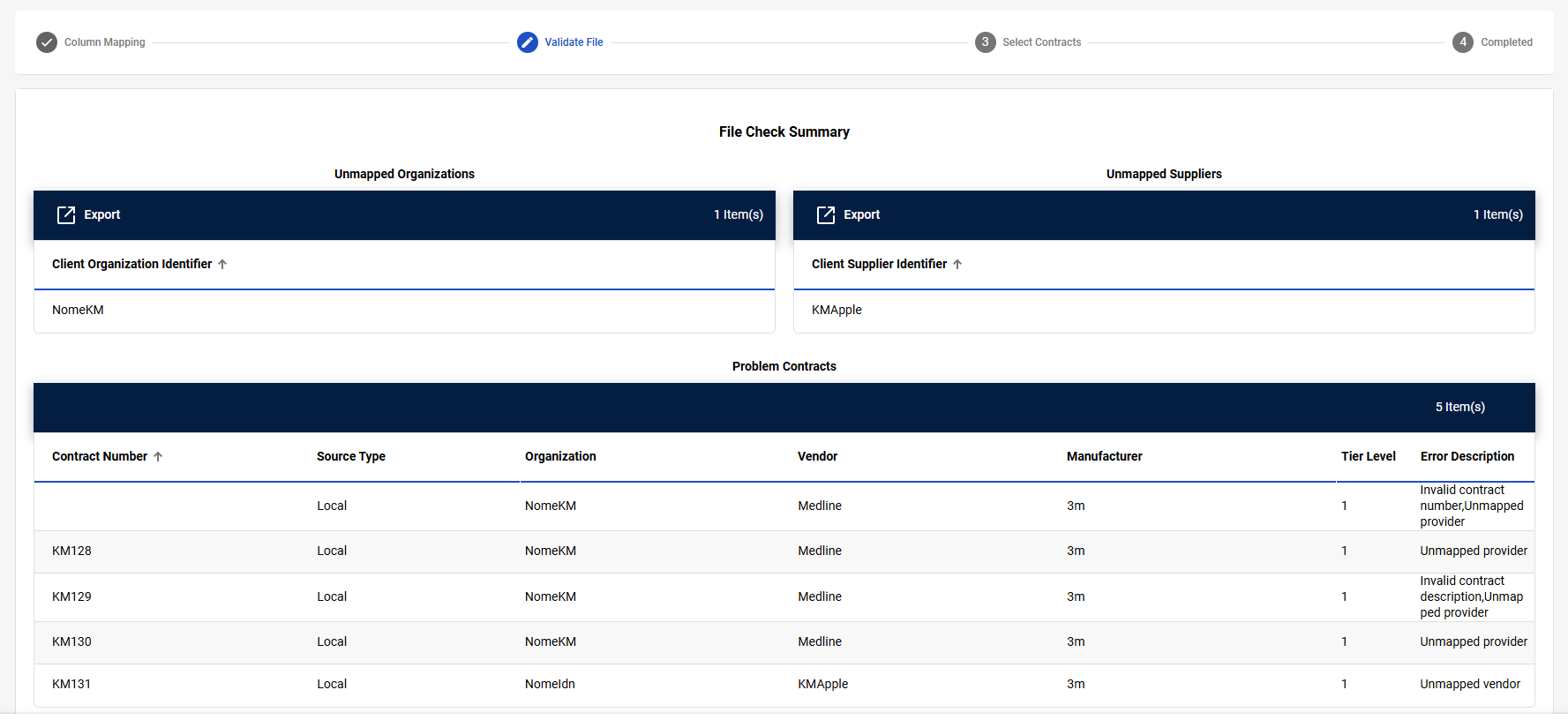
The Validate File step is the second step in the Multiple Contract Upload process. During this process, CCXpert validates the organization, contract number, contract description, tier, tier description, manufacturer, and vendor. In this step, you will review and resolve any validation errors, unmapped identifiers, or problem contracts before continuing the Multiple Contract Upload process.
Navigation
This step appears when you select Next on the Column Mapping step.
Field Descriptions
The following fields may appear during the Validate File step.
|
Field |
Field Description |
|---|---|
|
Unmapped Organizations and Unmapped Suppliers |
|
|
Export |
Select to export a list of the unmapped identifiers. The list is exported in XLSX format. |
|
# Item(s) |
Displays the number of items in the table. |
|
Client Organization Identifier, Client Supplier Identifier |
Displays the unmapped identifier from the contract. Note: Client Supplier Identifier lists unmapped vendors and manufacturers.
|
|
Problem Contracts |
|
|
# Item(s) |
Displays the number of items in the table. |
|
Contract Number |
Displays the contract number. |
|
Source Type |
Displays the contract source type. |
|
Organization |
Displays the organization associated with the contract. |
|
Vendor |
Displays the vendor associated with the contract. |
|
Manufacturer |
Displays the manufacturer associated with the contract. |
|
Tier Level |
Displays the contract tier level. |
|
Error Description |
Displays an error message detailing what is preventing the contract from being uploaded. Hover over the message to read the full error. |