Run Reports
Notification reports can include up to 92 days of history.
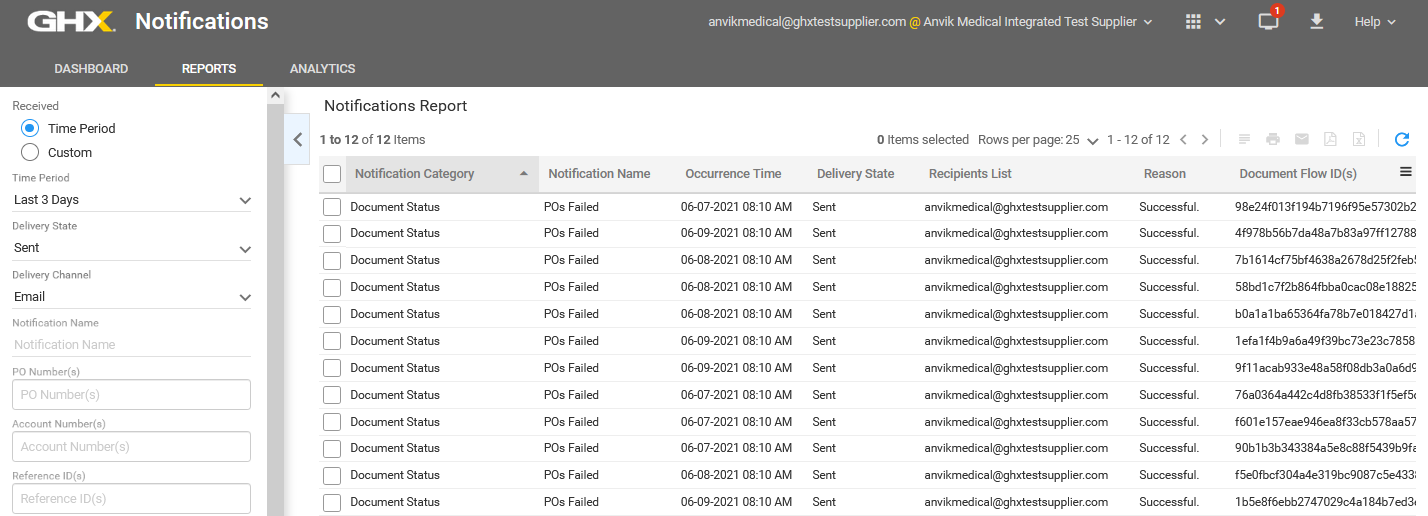
- Click Reports. The Notifications Report page opens.
- Define the following filters in the left pane (optional).
 Options are:
 Field Description Time Period - Received Identifies the time period when the notifications were sent.
Options are:- Time Period – Choose from the following options:
- Today
- Yesterday
- Last 3 Days
- Last 7 Days
- Last 2 Weeks
- Last 30 Days
- Last 3 Months
- Custom – Select From and To dates from a calendar
Delivery State Identifies whether the notification was successfully received.
Options are:- All
- Sent
- Failed
Delivery Channel Identifies the notification delivery channel.
Options are: - All
- SMS
Notification Name Type a notification name.
PO Number(s) Type one or more PO numbers, separating multiple numbers with commas. Account Number(s) Type one or more account numbers, separating multiple numbers with commas. Reference ID(s) Type one or more reference IDs, separating multiple numbers with commas. Document Flow IDs Type a document flow ID number. Recipients Type an email address or phone number. Notification Categories Select one or more categories.
Options are: - All – Includes notifications from all categories
- Document Status – Relates to a business process status (for example, documents in an Error status)
- Document Correlation – Compares criteria to other criteria (for example, when you do not receive a POA one day after receiving the PO)
- Document Volume and Trend – Monitors business process volume and trends (for example, notifies you when you receive more than 1000 documents by noon)
- MetaTrade PO Confirmation Reminder – Sends a reminder from the buyer organization to the MetaTrade supplier that is receiving the PO to log in and confirm the PO (if they have not already done so)
- GHX Document Status Monitor – Includes failure notifications for activities such as PO and invoice account numbers from unregistered trading partners; added by GHX
- GHX Registration Event Monitor – Includes items such as registration requests; added by GHX
- GHX System Event Monitor – A rare technical system-level event; added by GHX
- PO Delivery – Includes notifications for Intelligent Business Rules actions such as stopped or rejected lines and stopped orders
Document Content – Includes POs that contain data attributes that were defined in the notification criteria
Parked PO – For organizations that subscribe to GHX Intelligence Business Rules
- Time Period – Choose from the following options:
- Click Run Report.