FAQ: Advanced Transactions for Single Channel
Overview
 What are advanced transactions?
Advanced Transactions are documents that are traded on the GHX Exchange other than the four core document types: purchase orders, purchase order acknowledgements, advance ship notices, and invoices. Customers that have subscribed to the GHX Single Channel Services product can establish trading relationships with other Single Channel customers that support the same advanced transaction data set. Registration Center supports the following advanced transactions. (The description name in Registration Center is in parentheses.)
-
EDI 832 – Price Catalog (Catalog)
-
EDI 844 – Chargeback Request (Prod Xfer Acct Adj)
-
EDI 845 – Contract Notification (Price Auth Ack/Status)
-
EDI 849 – Rebate Response (Prod Xfer Acct Adj Response)
-
EDI 852 – Product Activity Data (Prod Activity Data)
-
EDI 867 – Sales Tracing (Sales Tracing)
Advanced Transaction Management
How do I manage advanced transactions?
Your organization must be subscribed to the GHX Single Channel Services product and be configured for each Single Channel transaction your organization supports.
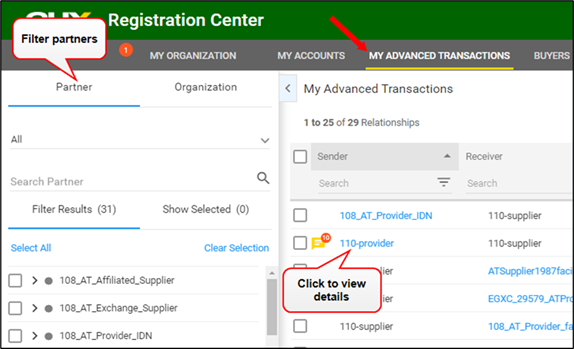
To manage Single Channel advanced transactions, click the My Advanced Transactions tab in Registration Center, where you can:
-
View all available trading partners and their supported transactions
-
Initiate new advanced transaction requests with available partners
-
View transaction details, including the envelope routing required for processing documents through the Exchange
Why do I see my advanced transactions tab in Registration Center?
Even if your organization does not subscribe to the Single Channel Services product, the My Advanced Transaction tab will display in Registration Center if your organization trades an advanced transaction document with a trading partner that subscribes to the Single Channel Services product. This gives you visibility to the Single Channel advanced transaction relationships that have been established with Single Channel customers.
Can I register an advanced transaction by account number?
GHX does not support account registration for advanced transactions in Registration Center. If your organization has advanced transaction documents that are registered and routed by account number, please continue to submit those registration requests to GHX Customer Care.
Advanced Transaction Requests
Why do I not see advanced transaction requests?
You will see advanced transaction requests only if your organization subscribes to the Single Channel Services product. By subscribing to Single Channel, you have the option to review advanced transaction requests before approving them for use.
Advanced Transaction requests are displayed on the Requests page by choosing the Advanced
Transaction view option that is shown when clicking Requests in the main menu. (The default view is Accounts requests.)
If your organization has not subscribed to the Single Channel Services product, but it is affiliated to Single Channel through a trading partner relationship with a Single Channel subscriber, those relationships are automatically enabled after the Single Channel subscriber makes the requests.
Why do I not see the My Advanced Transactions tab?
Currently, the My Advanced Transaction tab is only visible to Single Channel Services customers. It is not visible if you are a Price Align customer and support the catalog advanced transactions.
My Advanced Transactions User Interface
What actions can I take on the My Advanced Transactions tab?
On the My Advanced Transactions tab:
-
Organizations that subscribe to the Single Channel Services product can manage their advanced transactions
-
Organizations that are affiliated with trading advanced transactions can view their single channel relationships, but cannot manage them
How do I create/request advanced transactions?
Organizations that subscribe to Single Channel Services can create and respond to requests.
To create a request:
-
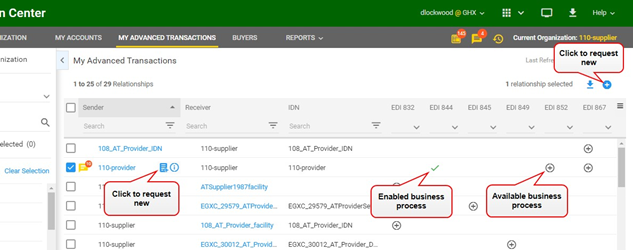
Select a trading partner and business process you want to establish with the trading partner.
-
Click either the
 icon (in the action menu on the right) or the
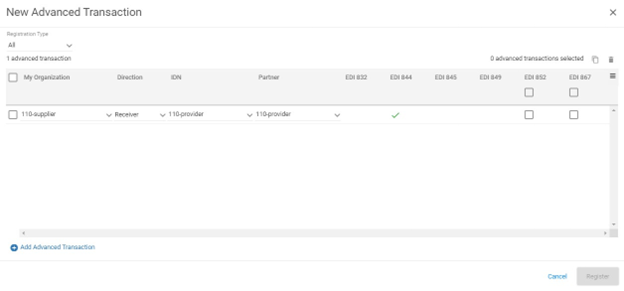
  icon, which displays when you point to an available Sender or Receiver name. The New Advanced Transaction form opens.
-
Select the business processes you want to set up and click Register.
-
If the partner is an Exchange customer, they will receive a request in Registration Center that they can view by clicking Requests > Advanced Transactions. They will also receive an advanced transaction request registration email message. New business processes will be established when the Exchange partner approves the request.
-
If the partner is not an Exchange customer (but is affiliated), the Advanced Transaction request will automatically have an Enabled status. It is up to the customer to notify their partner that they are ready to transact using Single Channel documents through the Exchange.
-
 How do I approve or deny advanced transactions?
To approve or deny advanced transactions:
-
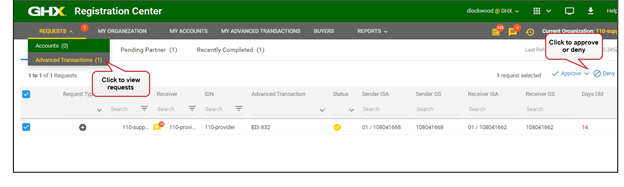
Click Requests in the main menu and select Advanced Transactions.
-
Select one or more requests and click the Approve or Deny button. The request moves to the Recently Completed tab and an advanced transaction registration confirmation email message is sent to both partners, confirming the business process setup has been completed.
 How do I disable or delete advanced transactions?
To disable or delete Advanced Transactions:
-
Click the My Advanced Transactions tab.
-
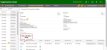
Click the partner name in the Sender or Receiver column. The Advanced Transactions Details page opens.
-
Scroll down to view the Details.
-
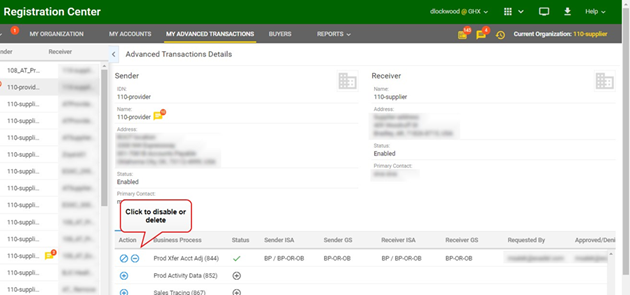
Click the
 icon to disable the transaction or the
  icon to delete.
 How do I send advanced transactions messages?
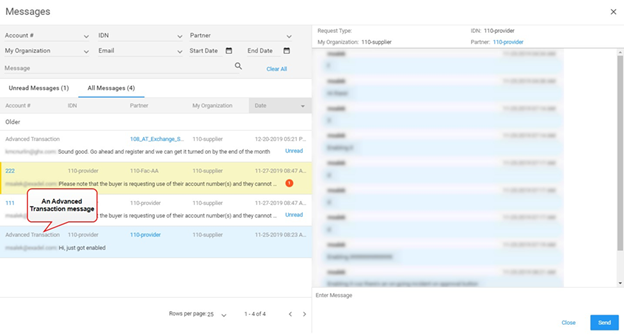
Advanced transaction messages are at the trading partner level and display with other account-level messaging. The words “Advanced Transaction” are displayed in the Account # column for all advanced transaction messages.