Manage Columns
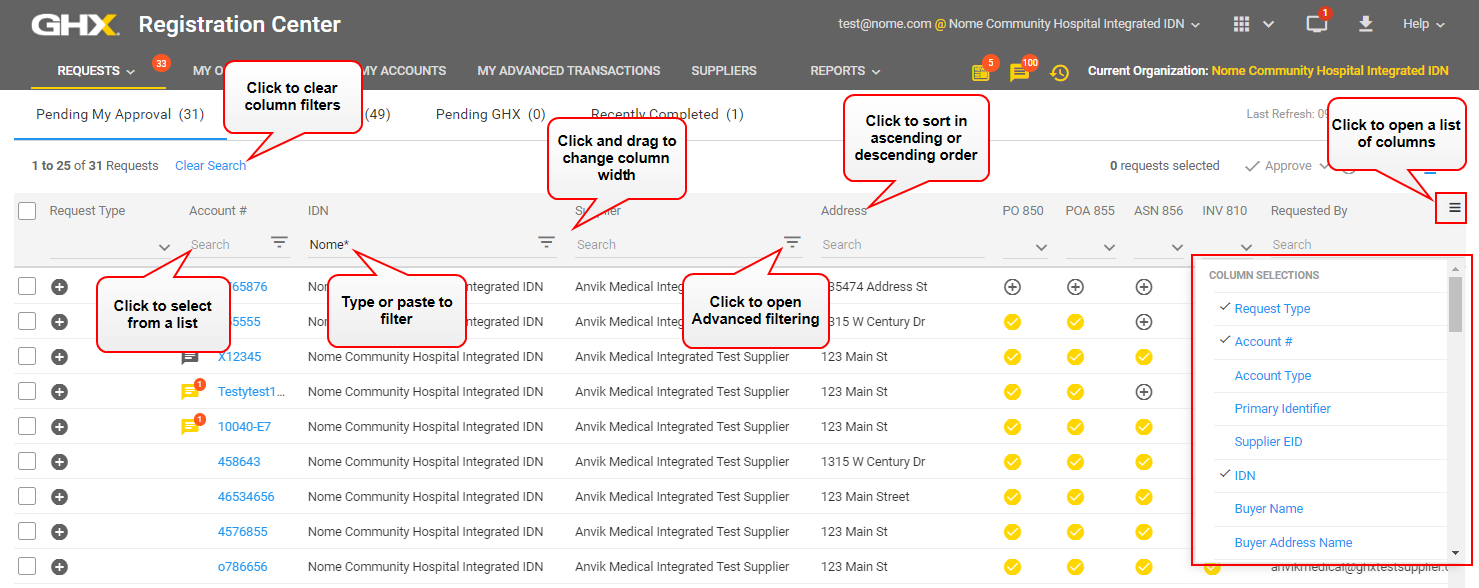
You can show, hide, resize, and move columns in tables throughout the application. When you make changes to the default column structure (for example, when you move a column to another location), those changes become permanent and you will see them the next time you open the application.
Note: Currently, there is no method for returning to the default column settings. Therefore, when you move a column to a new location, it will remain there until you manually move it again.
- To show columns, click the
 icon (located on the far right of the table heading) to open the list and click to show the columns; a checkmark means the column shows
 - To hide columns, click the icon to open the list and clear the checkmarks
- To resize columns, click the line between the column headers and drag the line to the new location, or double-click the line between the column headers to auto-fit the column size to the content
- To move columns, click the column header name and drag the column to the new location
- To sort the data by a specific column, click the column heading
Tip: Some data table columns have additional methods for searching and filtering:
- Click the icon to the right of a column name to choose filter criteria from a list
- Type or paste search criteria in the Search field just below the column header
- Use the asterisk * wildcard character to narrow the search results
- Click Clear Search to remove these filters
-
Some data table columns have additional methods for searching and filtering:
- Click the
 icon to the right of a column name to choose filter criteria from a list
 - Type or paste search criteria in the Search field just below the column header
- Use the asterisk * wildcard character to narrow the search results
- Click Clear Search to remove these filters
- Click the
 Click the icon to watch a video about this topic. (adding columns)
Click the icon to watch a video about this topic. (resizing columns)
Click the icon to watch a video about this topic. (sorting columns)