Add Attachments
While you have an opportunity to add an attachment when loading a local contract, you may need to load an attachment outside that process.
To add attachments to a contract:
-
Navigate to the Contract Details screen.
-
Select Actions > Add Attachments
 or select the Attachments Tab. The Add Attachment window appears.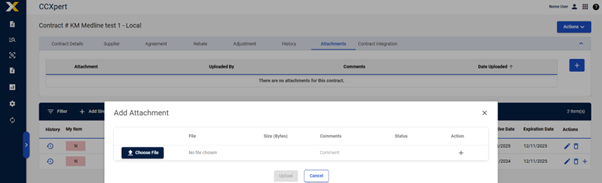
-
Select Choose File to search for and select a file from your computer.
-
Enter Comments if necessary.
-
Select Upload to upload the file or select Cancel to cancel the upload.