Attachments Tab
The Attachments Tab serves as a centralized repository for all documents and files associated with the contract. This tab enables users to view and manage attachments that provide supporting information, such as contract amendments, related correspondence, or other essential files. It ensures that all relevant documentation is easily accessible and organized.
Navigation
This tab is located on the Contract Details screen. To access this tab, search for and select a contract and select the Attachments tab.
Field Descriptions
The following fields appear on the Attachments tab.
Note: Descriptions for fields common to all Contract Details tabs can be found in the Contract Search topic.
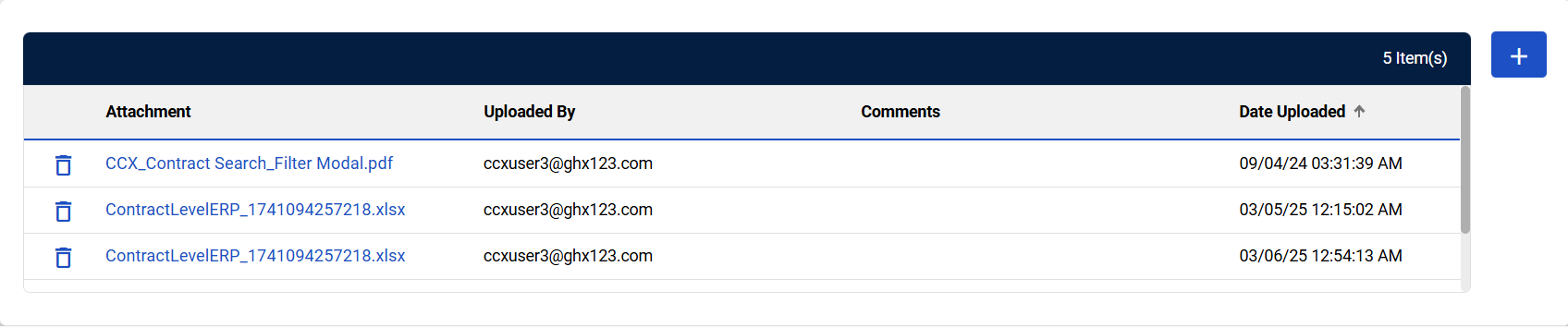
| Field | Field Description |
|---|---|
|
Add Attachments |
Select to add a new attachment to the contract. Refer to Add Attachments for more information. |
| # Item(s) | Displays the number of attachments in the table. |
|
Remove Attachments |
Select to delete the attachment from the contract. Refer to Delete Attachments for more information. |
| Attachment |
Displays the file or document associated with the agreement that has been uploaded. Select the attachment name to view and download the attachment. Refer to View/Download Attachments for more information. |
| Uploaded BY | Displays the name of the user who uploaded the attachment. |
| Comments | Displays notes or remarks related to the attachment. |
| Date Uploaded | Displays the date on which the attachment was uploaded. |