Add Single Item to a Contract
While you can always add or edit multiple contract items using the Bulk Upload/Edit Items functionality, you may want to add a single item to an existing contract.
To add single items to a contract:
-
Search for and select the contract you want to add an item to. Refer to Search for a Contract for more information.
-
Select + Add Single Item.

-
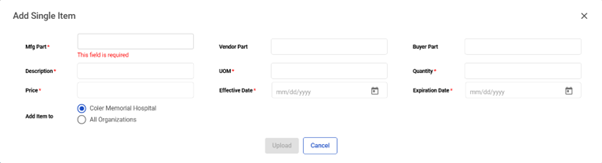
The Add Single Item window appears. Enter the item information as necessary.
Note: Required fields are marked with an asterisk (*).
-
Select Upload to add the item or select Cancel to cancel the item addition.