Contract Attributes
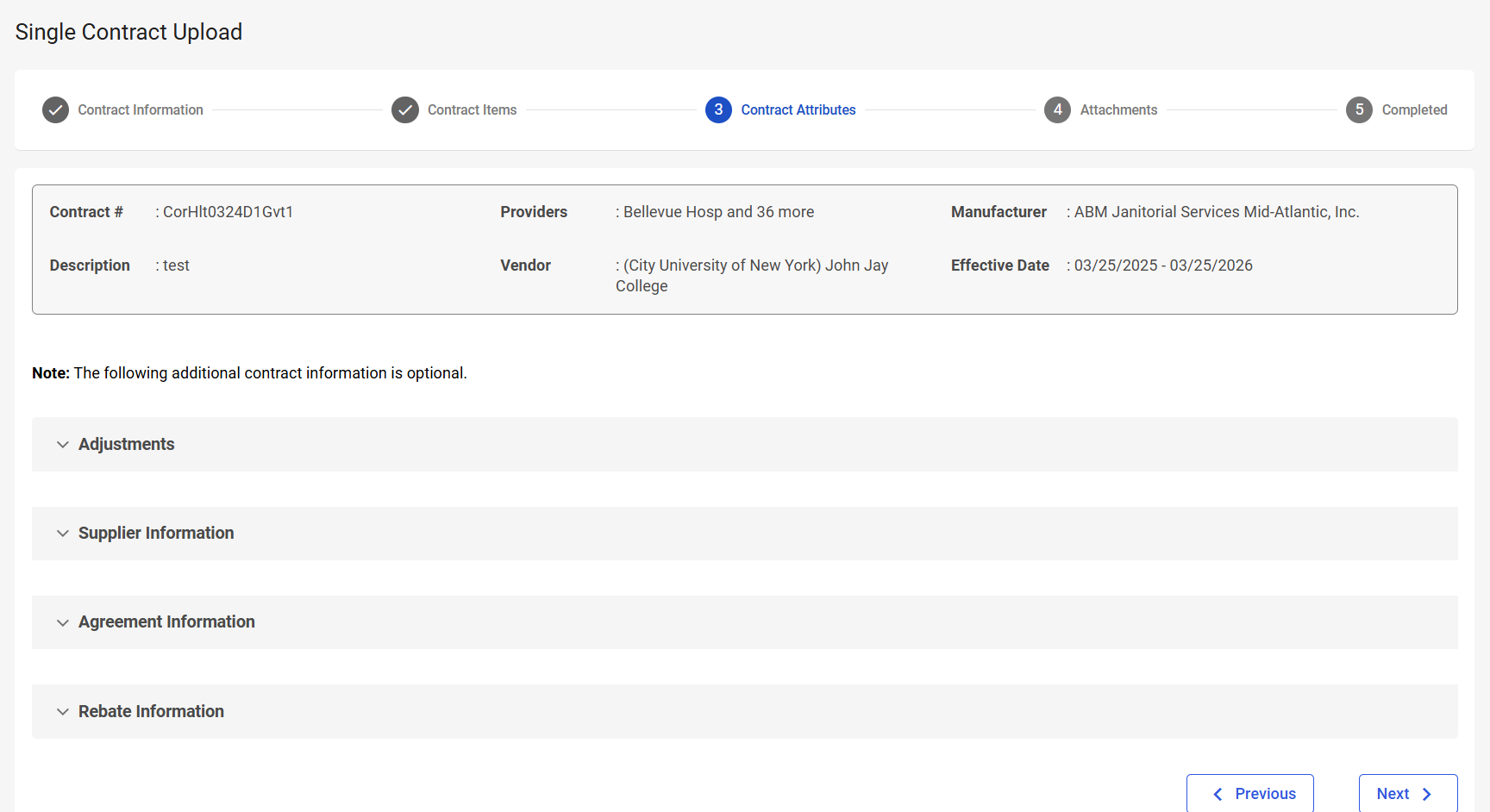
The Contract Attributes step is the third step in the Single Contract Upload process. In this step, you will modify contract attributes (adjustments, supplier information, agreement information, and rebate information) if necessary.
Navigation
This step appears when you select Next on the Contract Items step.
Field Descriptions
The following fields appear during the Contract Attributes step.
|
Field |
Field Description |
|---|---|
|
Contract Information |
|
|
Contract # |
Displays the contract number. |
|
Providers |
Displays the providers associated with the contract. |
|
Manufacturer |
Displays the manufacturer associated with the contract. |
|
Description |
Displays the contract description. |
|
Vendor |
Displays the vendor associated with the contract. |
|
Effective Date |
Displays the contract start and end date. |
|
Contract Attributes: Adjustments |
|
|
Contract Level Adjustments |
Indicate if there is a contract-level adjustment. The available options are:
|
|
Contract Attributes: Supplier Information |
|
|
Supplier Name |
Select the supplier. If the supplier is not in the list, select Add Supplier to open the New Supplier window. Enter the Supplier Name and select Add. |
|
Supplier Type |
Select the supplier type. The available options are:
|
|
Tax ID |
Enter the supplier tax ID. |
|
Phone |
Enter the supplier’s phone number. |
|
Address |
Enter the supplier’s address. If the address is not on the list, select Add Address to open the Add Address window. Enter the address information and select Save. |
|
City |
Enter the city associated with the address. |
|
State / Province |
Enter the state or province associated with the address. |
|
Zip |
Enter the zip code associated with the address. |
|
Rep First Name |
Enter the supplier representative’s first name. If the representative is not on the list, select Add Representative to open the Add Representative window. Enter the representative information and select Save. |
|
Rep Last Name |
Enter the supplier representative’s last name. |
|
Representative Email |
Enter the supplier representative’s email address. |
|
Representative Phone |
Enter the supplier representative’s phone number. |
|
Contract Attributes: Agreement Information |
|
|
Contract Owner |
Select the contract owner. |
|
Contract Type |
Select the contract type. |
|
Replacement for Contract # |
Enter the contract number this contract replaces. |
|
Product Description / Category |
Enter a product description or category for the agreement. |
|
Administrative Fee |
Enter the Administrative fee for the agreement. |
|
Notes |
Enter any notes about the agreement. |
|
Contract Review Date |
Select the date that contract needs to be reviewed. |
|
Contract State |
Select the state that represents the status of the contract. |
|
Price Protected Date |
Enter the Price Protected Date. |
|
Product UNSPSC |
Enter the UNSPSC value that best represents the items on this contract. |
|
GPO Contract Reference |
Enter the GPO contract that this contract references. |
|
Lease Payment Terms |
Enter the lease payment terms. |
|
Contract Attributes: Rebate Information |
|
|
Rebate Frequency |
Select the rebate frequency. The available options are:
|
|
Rebate Type |
Select the rebate type. The available options are:
|
|
Rebate Amount |
Enter the rebate amount. |
|
Date Rebate Expected |
Enter the date the rebate will be expected, or use the date picker to select the date the rebate will be expected. |
|
Other Contract Details |
Enter other contract details. You can enter any additional contract details you feel are important. There is a 250 character limit. |
|
Rebate Basis |
Select the rebate basis. The available options are:
|
|
Requires Commitment To |
Specify the unit of measure that needs to be committed to, to be eligible for the rebate. The available options are:
|
|
Commitment Measure |
Specificy the value of the selected unit of measure in the Requires Commitment To field. |
|
Method of Payment |
Select the method of payment. The available options are:
|
|
Other Known Competitors |
Enter any other known competitors. There is a 250 character limit. |