Item Master (IM) File Load History
The File Load History feature is designed to enhance visibility and operation efficiency within both the GHX Support and Provider Support views.
It provides:
Item Master Count Visibility: Displays counts of successfully loaded
Error Reporting: Highlights any issues encountered during the file load process.
This feature ensures accurate tracking, easier validation, and better accessibility of
Navigation Path
To access the File Load History, navigate to:
Data Connect Content Workbench > Support > File Load History
Access
Users with Customer Admin, Viewer, and Editor role can access the File Load History.
IM Provider Support View
Provider users can track file processing details for
When a
-
Total row count from the extract of
-
Error records (if any)
The captured data populates in the new File Load History tab.
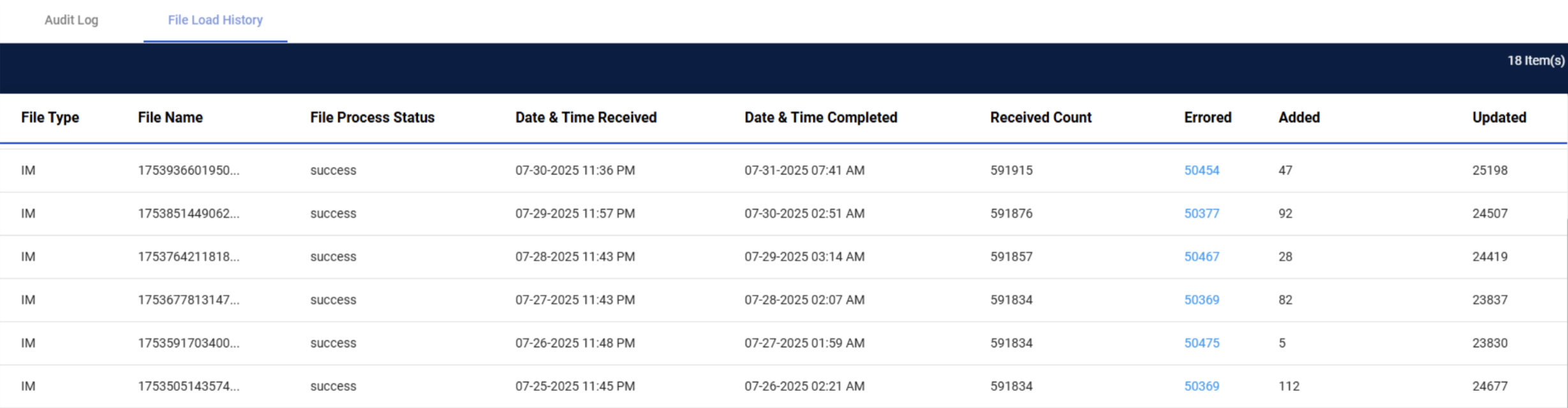
IM File Load History Columns
| Column Name | Description |
|---|---|
| File Type |
|
| File Name | Derived from |
| File Process Status | Status of job: Queued, In Progress, Success, Failed |
| Date & Time Received | Time stamp when |
| Date & Time Completed | Final completion time stamp: when the Content Workbench job process is complete |
| Received Count | Total number of rows received in the |
| Error Hyperlink | Downloadable Excel file showing error message(s) and full |
| Added | Count of new items not previously present |
| Updated | Count of existing items that were modified |
IM File Processing Schedule
The IM extract data includes active and inactive records for all associated vendor records.
When a job runs, GHX updates the count received From
Event based extract evaluates the current PCAT when received once a day based on the customer’s schedule. The GHX Master catalog is published twice a day at 5AM and 5PM est. Any changes to the item master as a result of the master catalog updates are also processed at that time.
When the item master processes, files refresh for the following:
-
Description Generation
-
Item Recommendations
-
Duplicate Review
-
My Data Explorer