Perfect Order Co-Pilot
The Perfect Order Co-Pilot (powered by GHX ResiliencyAI) is a feature within the GHX Supply Chain Analytics (SCA) application. This AI tool assists supply chain professionals by providing insights and recommendations based on the Perfect Order Rate and its underlying metrics. The Perfect Order Co-Pilot analyzes data from the Perfect Order Dashboard to help you understand your performance, identify areas for improvement, and take action to enhance your supply chain efficiency.
The Perfect Order Co-Pilot analyzes the data from the Perfect Order Dashboard, which includes metrics related to the Perfect Order Rate and its underlying subcategory KPIs. It provides insights and recommendations by:
-
Monitoring key metrics: The Perfect Order Co-Pilot tracks the Perfect Order Rate and its contributing metrics.
-
Benchmarking performance: The Perfect Order Co-Pilot compares your organization's performance with peer and best-in-class benchmarks to identify areas for improvement.
-
Identifying opportunities: The Perfect Order Co-Pilot highlights trading partners and transactions that contribute to exceptions, allowing you to address specific issues and improve overall performance.
-
Providing recommendations: Based on the analysis, the Perfect Order Co-Pilot suggests actionable steps to enhance supply chain efficiency and increase the Perfect Order Rate.
Access Perfect Order Co-Pilot
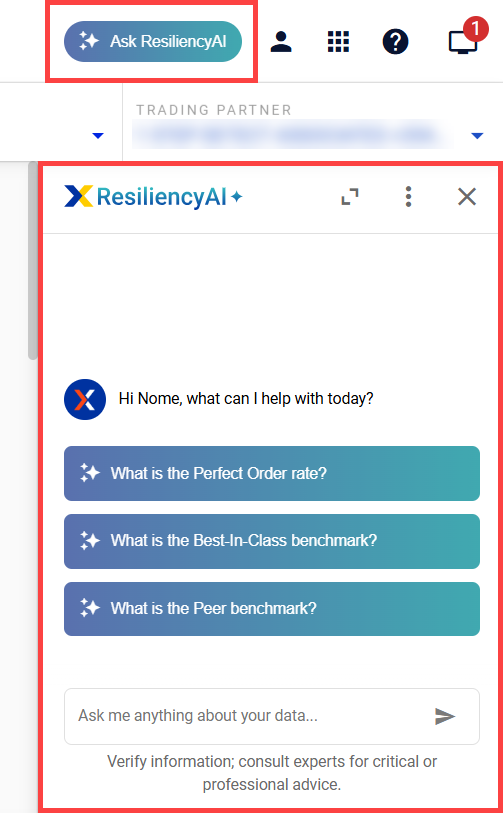
Select Ask ResiliencyAI on the Perfect Order rate dashboard to open the Perfect Order Co-Pilot. You can select from the pre-populated prompts or create and enter your own prompt in the search bar.
Perfect Order Co-Pilot Chat Interface Actions
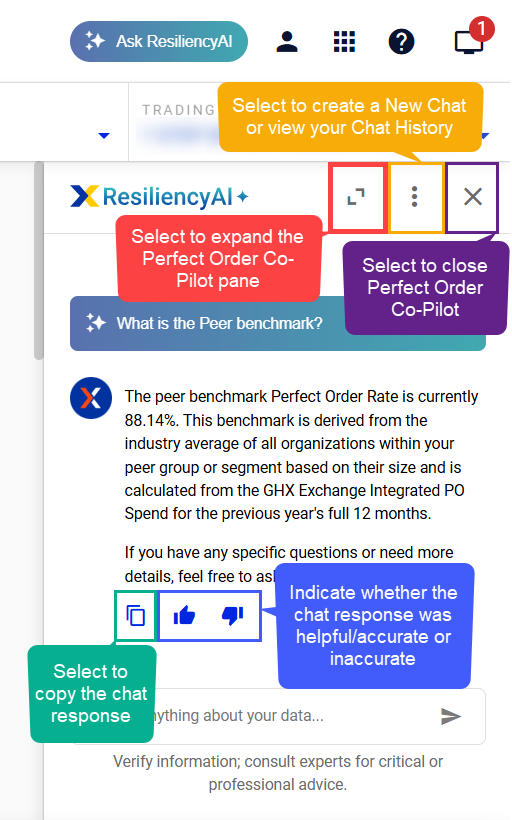
Before you get chatting with Perfect Order Co-Pilot, here are some actions within the chat interface that you will find helpful. You can:
-
Expand the Perfect Order Co-Pilot chat pane
-
Start a New Chat or view Chat History
-
Delete individual or all chat histories; to do this, view your Chat History and select the X next to a specific chat or select the Delete icon to delete all chats
-
Close the Perfect Order Co-Pilot chat pane
-
Copy the Perfect Order Co-Pilot chat response
-
Select a thumbs up/thumbs down to the Perfect Order Co-Pilot chat response
Related Help
-
For information on what types of questions Perfect Order Co-Pilot can help you answer, refer to Perfect Order Co-Pilot Question Examples.
-
For Perfect Order Co-Pilot prompting advice and best practices, refer to Perfect Order Co-Pilot Prompting Advice and Best Practices.