View Access Status
View a health system's access status when preparing for an on-site visit.
-
Select Accounts.
-
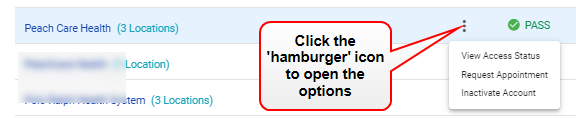
Select View Access Status from the 'hamburger' icon options for the desired health system.
-
Complete the required * fields.
-
Select View Access Status. A message opens.
-
Read the message to ensure you know how to prepare for an on-site visit.
Note: Health systems have a variety of policies and requirements, especially in regards to flu, COVID, and other vaccination documents. Seasonal requirements add even more complexity. Vendormate Credentialing helps keep this wide array organized for you. If you are being asked to load a document/ seeing a FAIL status, please follow these steps to ensure that you comply with the health systems' requirements.
-
Select OK.