Change Adjustment
Contract-level adjustments override vendor-level adjustments, so you can use them for contracts that require "special" adjustments. There are two ways to edit adjustment details.
Edit Adjustment Details From Actions Menu
To edit adjustment details from the contract's Actions menu:
-
Search for and select the contract with the adjustment you want to change. Refer to Search for a Contract for more information.
-
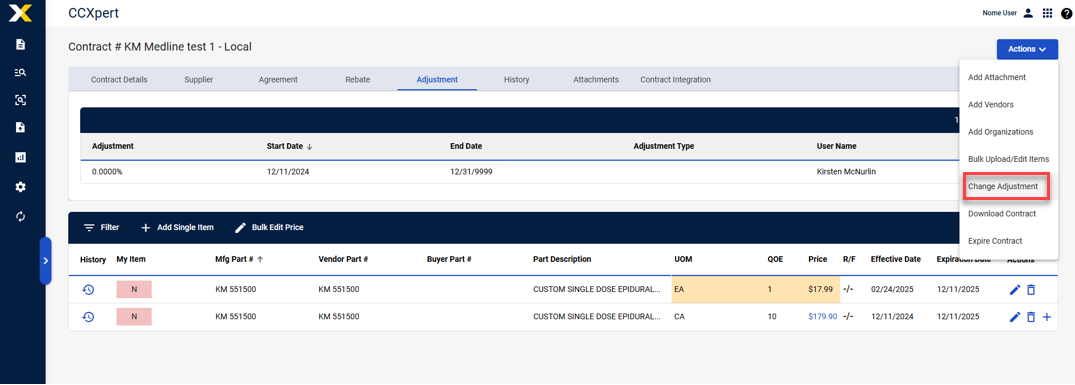
Select Actions > Change Adjustment.
-
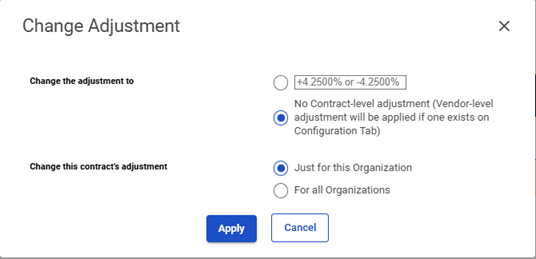
The Change Adjustment window appears. Edit the contract adjustment details as necessary.
-
Select Apply to apply the new adjustments. The new adjustments will take effect after midnight.
Edit Adjustment Details From Adjustments Tab
To edit contract adjustment details from the contract's Adjustments tab:
-
Search for and select the contract with the adjustment you want to edit. Refer to Search for a Contract for more information.
-
Select the Adjustment tab.
-
Select Edit Adjustment.
-
The Change Adjustment window appears. Edit contract adjustment details as necessary.
-
Select Apply to apply the new adjustments. The new adjustments will take effect after midnight.